You can use google chrome to view the live demo.
View Live Demo
The SQLite library used in the demo can be used in PhoneGap.
To see the source code, please go to github:
https://github.com/leotsai/html5sqlite
Showing posts with label PhoneGap. Show all posts
Showing posts with label PhoneGap. Show all posts
Friday, January 3, 2014

Tuesday, December 31, 2013
Using AngularJS/Backbone in PhoneGap
This article will not teach you how to use AngularJS or Backbone in PhoneGap,
but still, I promise, it will be helpful for your PhoneGap development.
Actually, this article will let you know that you don’t need to use angularJS/backbone in your phonegap development.
Firstly, I completely agree AngularJS and Backbone are very cool JS frameworks.
But I don’t think they are appropriate for phonegap. Why?
1. The route feature makes page navigation too complex.
The route feature is very important for web applications,
but there is a much simpler way to achieve page navigation & parameters in phonegap,
because phonegap APP’s don’t need to handle the URL.
And it is the URL that makes the route much more complex.
Can you think about what is the simplest way to make a page navigation? Here is our code:
var login = new LoginPage();
login.username = “leo”;
app.gotoPage(login);
With the above page navigation, you don’t need to configure the so-many routes.
The complex routes make your code harder to understand, at least harder than the above code.
As we don’t need to consider URL in phonegap, we can save a lot of code in achieving page navigation,
which probably saves performance. And the simpler code is easier to understand.
2. The coding style is so bad.
This is my personal opinion, and you will probably argue with this point. I’m glad to see your comments.
When working with AngularJS/Backbone, you will find there are so much code looking like:
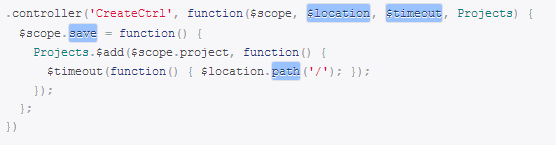
I really hate such a coding style. The above controller is defined(or described) by the code,
but you never see where it’s called, and you cannot call this method either.
The most fatal issue is There Is No Intelligence when you write the code, which made me crazy.
Below link shows what I think is an example of better coding style:
http://cordova.codeplex.com/SourceControl/latest#demos/AnnualTargets/www/scripts/at/05.pages/Menu.js
I believe this code is much more readable than the angularJS one.
So, if we don’t use AngularJS or Backbone, what shall we use?
Here I recommend Nova PhoneGap Framework
Nova PhoneGap Framework was born in November 2012, from the first release till this moment,
this framework has been tested/experienced by multiple projects, and it is stable now.
We are also continue to update this framework to make it perfect. For small and medium projects,
you can directly use the framework. For very large projects,
you can easily customize the architecture to what you want to perfectly support your projects.
Core features:
- Help you organize your files in a reasonable structure;
- Complete solution for page navigation, page parameters, and page events (load, navigate, away, etc.);
- Complete solution for device events (android backbutton, menu button), easier to use;
- Complete solution for local database access (SQLite);
- Optimized scroll bar;
- Other plug-ins & best practices, such as mock, log, carousel, busy indicator.
In short, Nova PhoneGap Framework makes your code more readable, while reducing demands on the ability of the programmer,
even junior programmers can quickly get started and complete the development with high quality.
Are you looking for PhoneGap programmers or PhoneGap developers?
Feel free to
contact us
. Free quote is available.
Looking forward to your comments.
Wednesday, October 30, 2013
The Best PhoneGap Architecture - (4)
Enjoy the art of the coding...
4. Android backbutton handlers
As I know, many PhoneGap APP’s don’t handle android backbutton event.
For example, the ones built with jQuery Mobile.
When a user taps the backbutton on the android device,
the APP just goes back to the previous page, and if no previous page found,
the APP exists without a message.
This is absolutely not acceptable for professional PhoneGap developers. Because many pages cannot simply go back,
and there should be customizable handlers to handle backbutton event on each page.
Now I’m going to show you how our architecture lets you handle the backbutton so easily.
Firstly, nova.application has an array property named histories that stores all pages except for the index.html.
And then, each page (inherited from nova.Page) has an array of backbuttonHandlers.
When you press backbutton on the page while the array is empty,
the APP will automatically goes back to previous page if there are any in the histories.
You can clear and set nova.application.histories as you wish.
You can go back to a specified page by putting a parameter to nova.application.goback(urlUntil).
You can handle custom backbutton event easily for each page, something like:
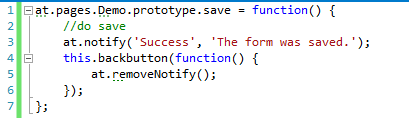
Normally, backbutton is widely used on android phones in cases of:
remove notification, cancel dialog, cancel progressing bar, etc.
If the handler is not ever needed, then you need to call this.backbuttonHandlers.pop();
nova.application.currentPage
Another property of nova.application. You can access to this object anywhere.
It can be used to handle backbutton out of the page definition, instead, can be in helper methods, ect.
Nova.Page.isBackbuttonDisabled
This issued to disable the backbutton on the current page. If it’s set to true,
no backbutton handlers will execute. You will find it useful in some situations.
How to test backbutton handler in web browser?
It’s really simple.
Suppose you are using Google Chrome. In the console, enter “cordova.mock.triggerBackbutton()”.
It mocks a backbutton event is triggered.
You can trigger other events by calling “cordova.mock.trigger(‘menubutton’)”. Of course,
you need to using cordova.mock.js instead of cordova.js when testing on web browsers.
You can read another post on how the mock framework works
here.
Friday, October 25, 2013
The Best PhoneGap Architecture - (3)
Enjoy the art of the coding...
3. Page And APP Navigation
First, JS part.
Here is a very good sample that demonstrats how to make a page and achieve page navigation.
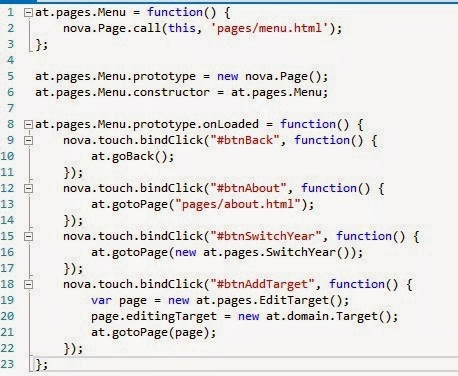
Here is a page named “Menu” that inherits from nova.Page.
It’s method onLoaded will be called when the HTML loaded into the #body div.
Please notice the bindClicks events. It demonstrates 4 kinds of page navigation.
- Simply go back. (android backbutton can also trigger this).
- Go to a simple page
- Go to a normal page.
- Go to a normal page with parameters.
If you are making a complex page, you can add many more methods to the page prototype object.
More examples:
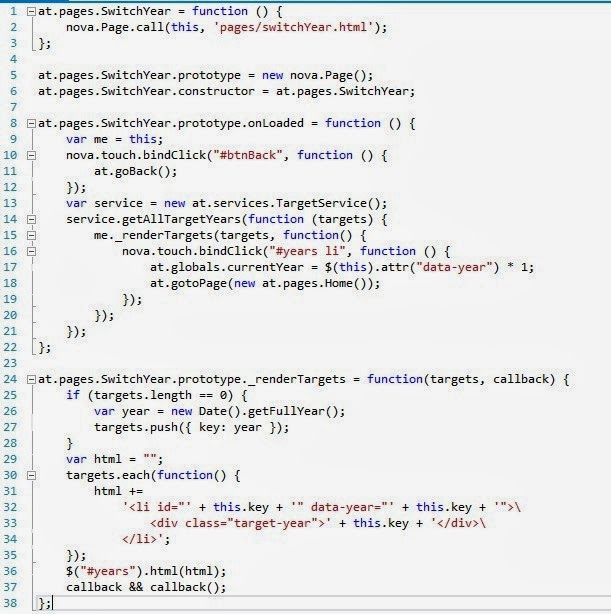
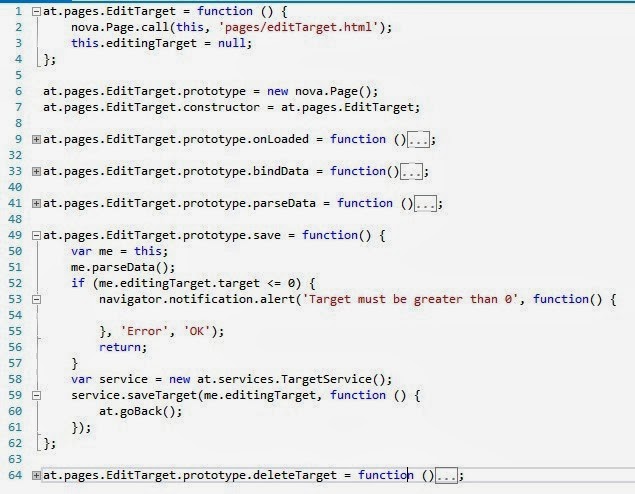
Then, how is the HTML part?
Second, the HTML Part.
Take a look at the below HTML page.
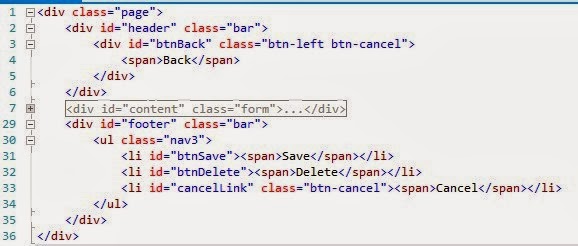
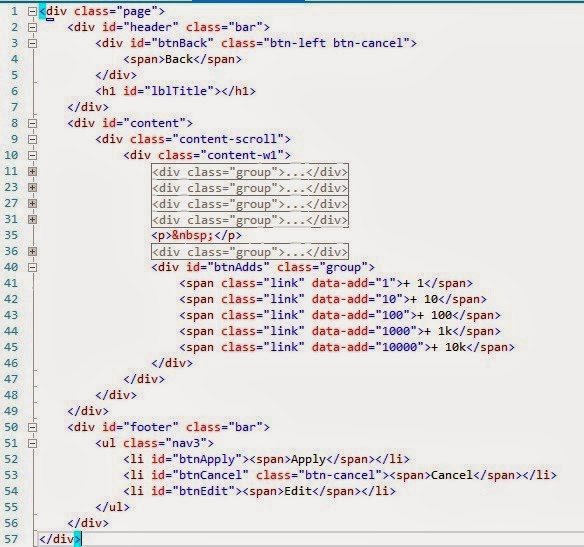
It’s clean and easy to write. As the basic layout and JS are initialized when APP starts on index.html,
the other pages just need to focus on the single page logic. You will love it!
More examples:
The Best PhoneGap Architecture - (2)
In the last post, I described the file structure.
In this post, I will describe the shell of the APP.
2. APP Starts And Index.html
Firstly, let’s take a look at the index.html.
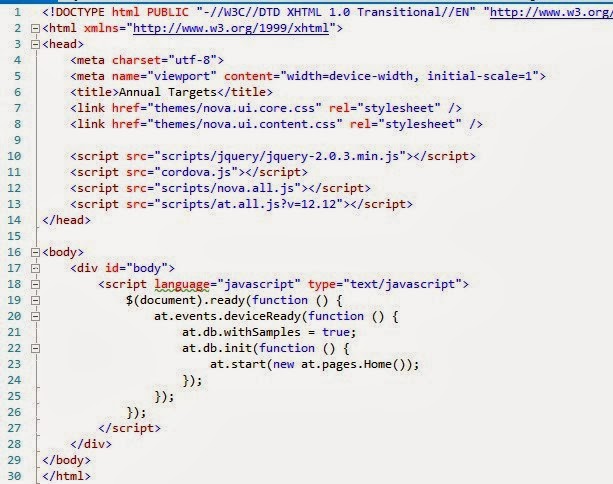
This page is a shell of your APP. All JS and CSS are loaded once when the APP starts.
You can use this page as a master page of your APP, and you can initialize everything here.
After the initialization is done, call: at.start(new at.pages.Home());
Before running the project, you need to merge all the JS files into the "at.all.js".
There are many tools can do the merge.
Please notice the scripts links. It’s using jQuery.
Don’t worry, the performance is very good after tested on many of our projects.
And then the cordova.js, nova framework(nova.all.js), project (at.all.js).
So is this file, very clean.
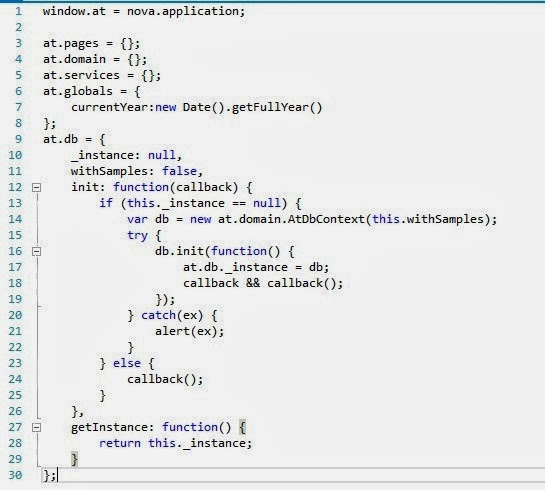
Here the variable at = nova.application, and extended with other properties.
The parameter is a page that inherits from nova.Page.
I will describe it how easy to make a page in the next section:
APP Navigation
at.js
The Best PhoneGap Architecture - (1)
It's not because it's written by our team,
but I do think it is the best I ever work with after trying so many other architectures.
Here "other architectures" mean the ones based on libs or frameworks or combine like jQueryMobile,
KendoUI, SenchaTouch, AngularJS, BackBone, etc.
Let me show you why it’s the best:
1. Highly Readable Code
A good architecture MUST create clear file structure.
The files must be organized very well to keep the code highly readable, which means:
- No file have more than 300 lines of code, normally less than 200;
- No folder have more than 30 files.
See below screenshot.
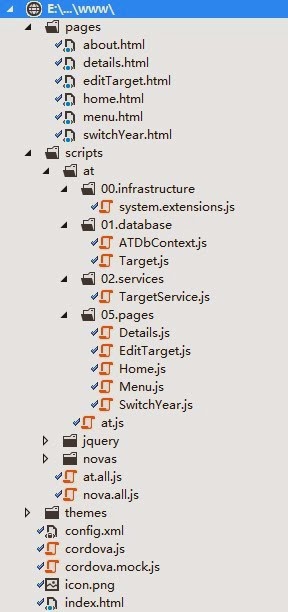
How does it look? I believe it looks very clear. All html pages are put into folder “pages”.
All project-related javascripts are put into “scripts/at”, and there a few layers to group the JS files.
You can easily get to know where to create new files or folders under this architecture.
How this structure can be done?
Please read the next section:
APP Starts And Index.html
Wednesday, August 14, 2013
How jQuery Mobile Eats PhoneGap Performance, See Experiment
As we know, jQuery Mobile renders a lot of HTML for a simple element/widget.
For example, the below picture(from jQM demos) shows the HTML source code (right) of a simple list item(left).

However, to make such a list item, the html can be as simple as just:
<li>Acura</li>(don’t know how? Leave a comment.)
But how will HTML elements affect the performance? Let’s take an experiment to see.
I wrote a simple page to test it.
Open live demo for web browser(PC & Phone)
<!DOCTYPE html>
<html xmlns="http://www.w3.org/1999/xhtml">
<head>
<meta charset="utf-8" />
<meta name="viewport" content="initial-scale=1, width=device-width" />
<title></title>
<script src="http://ajax.aspnetcdn.com/ajax/jQuery/jquery-1.7.1.min.js"></script>
</head>
<body>
<p>
<input type="button" value="Render jQM" id="btnRenderjQM"/>
<input type="button" value="Render Custom" id="btnRenderCustom"/>
</p>
<p><b>Time: </b><span id="time">0</span></p>
<ul id="result" style="height: 200px; overflow: auto;"></ul>
<script language="javascript" type="text/javascript">
var time = null;
$(document).ready(function() {
var li1 = '<li data-corners="false" data-shadow="false" data-iconshadow="true" data-wrapperels="div" data-icon="arrow-r" data-iconpos="right" data-theme="c" class="ui-btn ui-btn-icon-right ui-li-has-arrow ui-li ui-first-child ui-btn-up-c">\
<div class="ui-btn-inner ui-li">\
<div class="ui-btn-text"><a href="#" class="ui-link-inherit">Acura</a></div>\
<span class="ui-icon ui-icon-arrow-r ui-icon-shadow"> </span></div>\
</li>';
var li2 = '<li>Acura</li>';
$("#btnRenderjQM").click(function() {
var $ul = $("#result");
$ul.empty();
var html = '';
for (var i = 0; i < 1000; i++) {
html += li1;
}
time = new Date();
$ul.html(html);
$("#time").html(new Date() - time);
});
$("#btnRenderCustom").click(function() {
var $ul = $("#result");
$ul.empty();
var html = '';
for (var i = 0; i < 1000; i++) {
html += li2;
}
time = new Date();
$ul.html(html);
$("#time").html(new Date() - time);
});
});
</script>
</body>
</html>
There are two buttons on the test page, one appends 1000 jQueryMobile list items to the list,
while the other appends 1000 simple list items.
Let’s see some charts.
Test in firefox:

Test in google chome:

Test on Android Phone:

Test in firefox:
Test in google chome:
Test on Android Phone:
The charts mean: HTML elements eat performance.
If we use simple HTML elements to render a page, it will save about 80% performance than using jQM.
If it’s a small page, that would be OK using jQM, if it’s a complex page,
I recommend you write the HTML elements by yourself.
The above test page can be viewed online here:
live demo for web browser(PC &Phone).
Contact US
Learn Our PhoneGap Development Service
Feel free to make comments or ask questions.
Monday, August 12, 2013
My PhoneGap With jQuery Mobile Development Experience
Recently my PhoneGap team has been working with jQuery Mobile for a few clients.
The overall development experience is really bad.
Project 1: tablet
The first APP I want to say is for tablet. Our team joined the development when the APP was about 90% done.
That APP used jQuery Mobile and also backbone.
When we joined the development, the code looked not very professional.
There are mainly two files for the project, two very big ones. One is the index.html that had over 2000 lines,
and the other is index.js that has over 5000 lines of code.
Our first tasks are very small and were done quickly,
but we still suffered from the too large code.
So we advised the client refactor, and the client accepted.
We then re-designed the code architecture and separated the big index.js
into many small ones based on functions.
The JS code became much clear, but the index.html is still very large(no change).
Later the client said the whole APP performance was not good,
then we tried many methods but finally we have to remove usage of jQuery Mobile.
It is because jQuery Mobile generates too many html elements for a simple element,
such as a button. When the data become a little large,
it costs a lot of time rendering so many html element.
And the html elements each performance during the whole lifetime of the page.

Another example:
For the above item template, we can change it to:
<li>Acura<span></span></li> , even the <span> is not necessary.
<li>Acura<span></span></li> , even the <span> is not necessary.
For some pages with big data, we refactored the html to use as few html as possible.
And the performance become much better.
Project 2: iPhone
We joined the project also from half way.
One of our tasks is to list all contacts and search and choose.
Normally, a phone has more than 200 contacts.
At the beginning, we used jQuery Mobile listview because the project was already using jQuery Mobile.
The list item template is not complex,
but the performance was very bad. It cost about 3 seconds to render 300 contacts.
Then we tried removing using listview, instead, we wrote a very simple UL,
and the performance become much better. We also spent much time on the listview item template,
since it doesn’t work well and not easy to use.
For this project, there are also mainly two big files: index.js and index.html.
The code is hard to read or maintain. We need to press CTRL+F to navigate to the right page all the time.
It’s really a nightmare.
In conclusion
The two projects originally used a lot of jQuery Mobile features,
but finally many of them are removed due to performance issues.
I think jQuery Mobile is only suitable for web applications, not for PhoneGap,
since performance is really a big concern in PhoneGap.
Till this moment, I haven’t seen any good jQuery Mobile project architecture.
A good code architecture should keep the code easy to read, easy to maintain,
and any developer knows where to put the code. Generally,
each file should have less than 300 lines of code, each method should have less than 30 lines of code.
Contact US
Learn Our PhoneGap Development ServiceWednesday, March 6, 2013
Three Most Important Skills For PhoneGap Developers
I have been developing PhoneGap apps for some time. A few days ago,
a new member of our PhoneGap team asked me a question:
what are the most important skills for a PhoneGap developer?
This blog shows my personal ideas on the above question. I'm open to see your opinions.
First, good understanding of Javascript OOP
The most important skills of a PhoneGap developer should be the javascript skills.
And a javascript expert must know javascript OOP(object-oriented-programming) well.
There will be many javascripts in your PhoneGap apps.
You will need to consider how to organize the javascripts,
which will be quite different from common web applications.
For common web apps, you probably use no javascript in OOP way.
You probably write code like below:
$(document).ready(function(){
     $("#btnSave").click(function(){
         //todo: save the form
    })
});
But for PhoneGap apps, too much code like above will make your app hard to maintain.
Here, I recommend you write your PhoneGap app in single-page-application,
since it behaves more like native apps,
instead of web apps, and it will be quite easy to navigate through pages.
In my PhoneGap experience, I found the below javascript OOP skills very important:
-
Class.
Normally I use the below code to define a class.
var ProductEditor = function(productId) { this.productId = productId; }; ProductEditor.prototype.save = function(callback) { //todo: save the form }; -
Namespace.
For example:
if(window.demo == undefined) { demo = { }; } if(demo.services == undefined) { demo.services = { }; } //define a class under the namespace demo.services.ProductService = function () { }; demo.services.ProductService.prototype.getProductById = function(id) { //todo: return product }; //to use the service var service = new demo.services.ProductService(); var product = service.getProductById(1); -
Class inheritance.
demo.services.EmailServiceProvider = function() { this.host = "smtp.gmail.com"; this.port = 587; }; demo.services.EmailServiceProvider.prototype.sendEmail = function(subject, body, to, cc) { }; //define another that inherits the above provider demo.services.ContactUsEmailServiceProvider = function() { demo.services.EmailServiceProvider.call(this); }; demo.services.ContactUsEmailServiceProvider.prototype = new demo.services.EmailServiceProvider(); demo.services.ContactUsEmailServiceProvider.constructor = demo.services.ContactUsEmailServiceProvider; //override the parent method demo.services.ContactUsEmailServiceProvider.prototype.sendEmail = function(body) { demo.services.EmailServiceProvider.prototype.sendEmail.call(this, "contact us", body, "cail@shinetechchina.com"); }; //define new method demo.services.ContactUsEmailServiceProvider.prototype.saveToDB = function(body) { }; - For other javascript OOP skills, you can google them.
Second, have the ability to handle touch events
Though in most cases, we don't need to handle touch events by ourselves, as the third-party libs
(
jquery mobile,
Nova PhoneGap framework,
Sencha Touch,
KendoUI, etc
) do it for us, we still need to know there are 3 very important touch events:
touchstart, touchmove, touchend.
If you want to do custom scroll/click/drag/double click/long press/..., or any other amazing effects, you will need to work with the 3 events.
If you want to learn more,
Nova PhoneGap framework
should be a good resource, as it handles the touchs in a simple way, and easy to read easy to learn.
Third, know well of PhoneGap API
- What features are supported by PhoneGap? What features are not?
- What are the free plugins?
- What kinds of projects are not suitable for to be developed in PhoneGap?
A PhoneGap developer should know the answers to the above questions well,
and keep an eye on the API upodates because the PhoneGap team work productively.
References in this post
- Third-party libs that enhance your PhoneGap development: jquery mobile, Nova PhoneGap framework, Sencha Touch, KendoUI
- If you want to outsource your PhoneGap development, please take a look at our company website Nova Software (China).
Wednesday, January 16, 2013
Entity Framework For Html5 SQLite, PhoneGap Data Access Framework
Notice: The HTML5 SQLite library has been picked out from Nova PhoneGap Framework, so it is a standalone library now. The latest source code and documentation have been moved to github https://github.com/leotsai/html5sqlite
Nova PhoneGap Framework has developed a framework for data access in html5 SQLite.
It works in a similar way with the C# EntityFramework (EF). See
documentation
Take a look at the below code then you will know it's so easy
to define your database and entities, and query, add, update, delete entities from the db.
// define dbContext & entities------------------------------------
var DemoDataContext = function () {
    nova.data.DbContext.call(this, "Demo", "1.0", "Demo DB", 1000000);

    this.users = new nova.data.Repository(this, User, "users");
    this.roles = new nova.data.Repository(this, Role, "roles");
};

DemoDataContext.prototype = new nova.data.DbContext();
DemoDataContext.constructor = DemoDataContext;

var User = function () {
    nova.data.Entity.call(this);
    this.name = "";
    this.password = "";
    this.birthYear = 1980;
    this.createdDate = new Date();
    this.deleted = false;
};
User.prototype = new nova.data.Entity();
User.constructor = User;

var Role = function () {
    nova.data.Entity.call(this);
    this.name = "";
    this.createdDate = new Date();

};
Role.prototype = new nova.data.Entity();
Role.constructor = Role;
// end define dbContext & entities------------------------------------

// service methods----------------------------------------------------
function getAllUsers(callback) {
    new DemoDataContext().users.toArray(function (users) {
        alert(users.length);
        callback(users);
    });
}

function getUserByName(name, callback) {
    new DemoDataContext().users.where("name='" + name + "'").toArray(function (users) {
        callback(users.firstOrDefault());
    });
}

function addRole(roleName, callback) {
    var role = new Role();
    role.name = roleName;
    var db = new DemoDataContext();
    db.roles.add(role);
    db.saveChanges(callback);
}

function updateUserPassword(username, password, callback) {
    getUserByName(username, function (user) {
        if (user == null) {
            throw "no user found.";
        }
        user.password = password;
        var db = new DemoDataContext();
        db.users.update(user);
        db.saveChanges(callback);
    });
}

function deleteUserByName(name, callback) {
    getUserByName(name, function (user) {
        if (user == null) {
            throw "no user found.";
        }
        var db = new DemoDataContext();
        db.users.remove(user);
        db.saveChanges(callback);
    });
}

// end service methods----------------------------------------------------
Saturday, December 8, 2012
General Ideas On The Architecture Of PhoneGap Project
Though PhoneGap uses web technologies (html, css, js) to build apps,
PhoneGap projects should be quite different from web projects.
Differences between web projects and PhoneGap projects
For web projects, every page is loaded by changing the url.
Each page works like a standalone application.
We can say, a web project has many javascript applications.
In each web page, we need to load all necessary javascript files(e.g. jQuery), because it is a standalone application.
But for PhoneGap projects, the whole project is an application,
just like the desktop applications.
So there should be only one main window that contains all resources/controls/data etc.
We don’t need to reload all base javasccript/css files on changing the “pages”(a page in PhoneGap is only a control).
The index.html
I suggest the index.html should be the startup page of your PhoneGap application.
Why? PhoneGap build service takes the index.html as the first page of your app by default.
The index.html only contains the base javascript and css files that are used in the whole app.
It shouldn’t contain any other html tags than the body tag.
All other pages are loaded through ajax into this “body”.
To make a better index.html, I suggest add a div#body into the body tag.
And other pages are loaded into #body.
Then you can add other contents(html, css link) to body tag as base template.
The application.js
Your project should have an “application.js” or “app.js”.
There is only one instance of Object in the app.js. Let’s named it as “app”.
Some global variables are defined as properties of the app instance, for example,
app.settings may contain the settings. Some methods should be defined,
such as app.start(), app.exit().
Make sure there is only one instance of the application,
because many app instances make no sense.
I don’t like KendoUI’s code about application in PhoneGap, it writes in the docs:
new kendo.mobile.Application($(document.body), { hideAddressBar: false });
The above code means you can new many instances of the application,
but which is definitely making no sense for PhoneGap.
Page Navigations
As mentioned above, all contents are loaded into the div#body via ajax calls.
You don’t need to change the URL address as your app is not running in browser.
As there may be many page navigations,
I suggest you add some methods to app instance for quick usage.
For example, app.gotoPage(url), app.goBack().
Then you have full control of your pages, and there will be no flashings on pages changing.
Conclusions:
All of the above are only my personal opinions.
I’m open to your comments, and looking forward to any different ideas.
I have worked out a basic solution. You can find all source code on
http://cordova.codeplex.com.
From the source code you can know how the index.html and application.js work.
References:
- All related source code: http://cordova.codeplex.com
- Our company is doing PhoneGap development outsourcing. Contact Us to request PhoneGap development service.
Sunday, November 25, 2012
Who Is Murdering PhoneGap? It's jQuery Mobile
So many people are now arguing the bad performance of PG apps,
because of that, many developers stopped entering the army of PG development.
Is PG really so bad?
The answer from me is absolutely NO.
I have to admit that there are so many bad PG apps.
Why? Who made them? The most PhoneGap developers. But the developers are innocent of murdering PhoneGap.
The real killer is jQuery Mobile.
The bad choice of jQuery Mobile for PhoneGap apps:
1. Not PhoneGap targeted.
jQuery Mobile is not targeting only for PhoneGap apps, instead, it’s developed for mobile WEBSITES. The pages/scripts/resources are organized in a website way, not a native app way. Take pages navigation for an example, a web app navigates to another page by changing the URL, but for desktop/native apps, we new an instance and put it into a wrapper control, the wrapper has full control to the new page, and can receive events of the page, which is quite different from web apps. So, if you are using jQuery Mobile to develop PhoneGap apps, you are probably missing a good application architecture.2. Too fat & bad performance.
jQuery Mobile does provide very-very many controls/functions, but only a very small part of them are used in apps, which causes much waste of performance. I’d like to take a simple function for example, the scroll. As we know, most mobile browser cores don’t support fixed position, so we have to write custom code to do it and handle the scrolling. jQuery Mobile writes a lot of code for this function, at the same time, a few related touch functions are also provided, but in most cases, the developers only need the scroll. In a word, jQuery Mobile handles too much things for a simple action.3. Bad documentation.
The jQuery Mobile documentation is not really documentation, but examples. Yeah, they are good examples, but absolutely bad documentation. Not all features are included in the examples, they missed many. This is quite hard for the developers. As some features are hidden from the developers, many developers have to write ugly code.4. Critical bugs/issues not fixed.
There are so many posts about jQuery mobile scrolling and page flashing. Unfortunately, I don’t see a remarkable answer to their questions. I asked a few developers, they seem to have given it up, and leave the bug/issue as is.
How to make a good PhoneGap app? Here I can share some general ideas:
- 1. Write your own javascript PhoneGap architecture if you are good at JavaScript. If you are not, you can follow me on codeplex where you can find PhoneGap architecture and demos.
- 2. Don not write future code. You don’t need to write code that “may be used in future”, instead, write code that is really used.
- 3. Resolve the critical bugs/issues by yourself. To make a good PhoneGap app, you must first be a JavaScript master, which means you can read others’ code and find the best solution for best of your app.
If you want to develop the best PhoneGap app, you can:
- Follow my PhoneGap team on codeplex: http://cordova.codeplex.com/
- Contact my PhoneGap team for service, or any questions, ideas.
If you are looking for PhoneGap programmers or PhoneGap developers, please feel free to contact us. Free quote is available.
Subscribe to:
Posts (Atom)